Today I am super excited to announce our new Tasks feature. Tasks lets you build AI workflows in Python and run them on a managed runtime. You don't provision servers or wire up infrastructure.
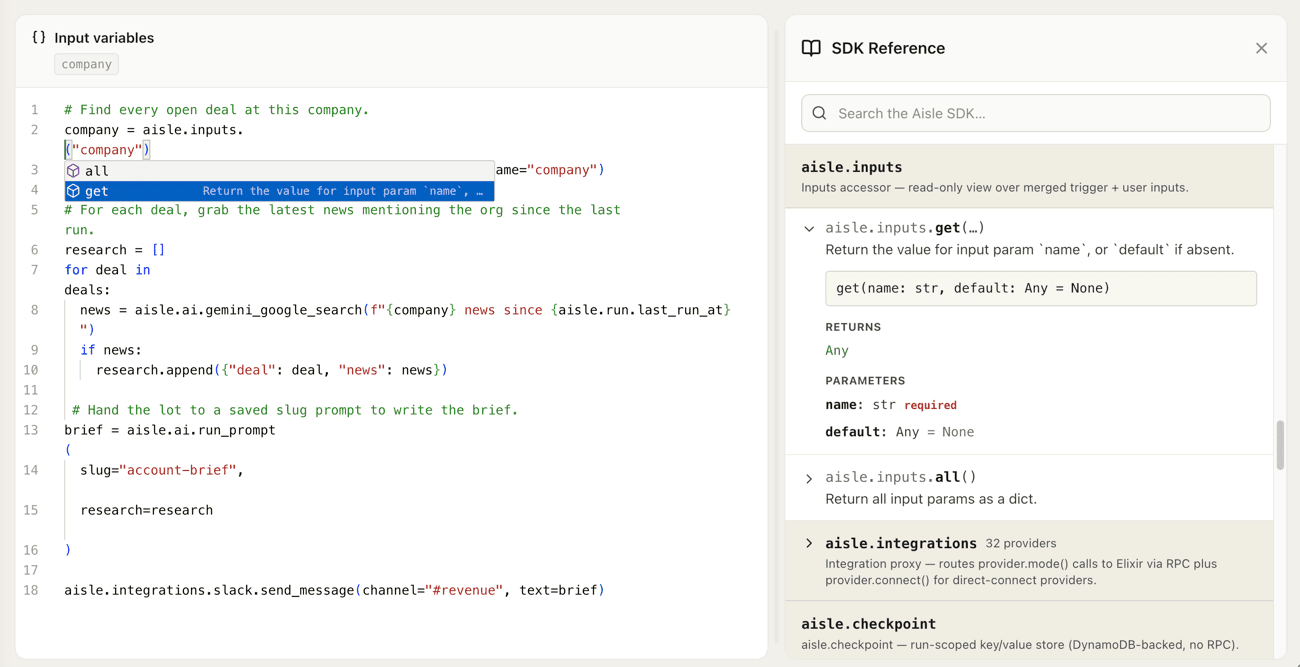
A task is a Python script that lets you build a deterministic AI workflow. It calls your versioned prompts, hits your integrations, reads and writes memory, and returns a result. This is an evolution to our workflows; you write the logic in code instead of dragging nodes around a canvas. Tasks are easier to read and version, and faster to change.
Like Workflows, Tasks can be run through the Aisle launcher, triggered by an HTTP call, or via integrations like Gmail, Slack, JIRA, Github, and Telegram.
# Find every open deal at this company.
company = aisle.inputs.get("company")
deals = aisle.integrations.pipedrive.search_deals(
    org_name=company,
)

# For each deal, grab news since the last run.
research = []
for deal in deals:
    news = aisle.ai.gemini_google_search(
        f"{company} news since {aisle.run.last_run_at}"
    )
    if news:
        research.append({"deal": deal, "news": news})

# Hand the lot to a saved prompt to write the brief.
brief = aisle.ai.run_prompt(
    slug="account-brief",
    research=research,
)

aisle.integrations.slack.send_message(
    channel="#revenue",
    text=brief,
)
This example shows how much simpler Tasks can be. It takes a company name, pulls active deals from Pipedrive, and runs a Gemini web search for news on each one since it last ran. It hands the deals and the news to an AI prompt that writes the brief, then posts the result to the team's #revenue channel in Slack.
Tasks let you focus on building the logic for your automation and not deal with deployments, LLM bindings, integration APIs, and team distribution.
Watch: Introduction to Aisle Tasks
Some highlights
- A managed automation runtime with parallel function execution and logs built in
- Call versioned AI prompts across OpenAI, Anthropic, Gemini, Grok & more
- Call pre-built integrations, from Pipedrive and Asana to Slack, as a namespace
- Built-in memory, web search, and structured outputs
- Git-style revision history on every task
- One-click deploy to create chats, update APIs, post to Slack, or trigger the next step
Tasks are live on the platform today — and many legacy workflows have already been migrated. This first version is aimed at builders. If you know enough Python to be dangerous, check out the Task Docs for details on how to get started. In the coming weeks, we're excited to show you some tooling for non-technical users to build automations they can trust too.
Video transcript
Hi, I'm Alex, founder of Vile, and today I wanted to take you through the new tasks feature that we are launching. For me, genuinely excited about this one. It feels like a cumulation of the last 18 to 24 months of effort that we've been putting in. So, jumping straight in, what is a task? It lets you build a deterministic AI workflow, but in Python.
Maybe you've built these before with our visual engine, with Nadn, Make, Zapier, Langchain, anything like that. to go through a short example and then I'm going to go deeper and keep this as short as I can. Looking at what this task is doing based on a company name, it's going to go through and search Pipe Drive for deals. It's going to go through and use a Gemini search to see if it can find any news about those companies, compile a brief and post it to Slack. This is really simple to understand and it's so nice to be able to do this in code.
And what's doing a lot of heavy lifting here is this SDK that lets you access any integration that's on the platform to go through and use any of the AI models and their search behaviors to be able to run any predefined prompt whether that lives on OpenAI, Gemini, Grock, uh we're forgetting one there, Claude, how could we forget about Entropic? Any of those you can actually run it on, including those predefined prompts, you can output that as a chat your team can communicate with or even just use another integration to output that to Slack. This is really impressive and for me as a programmer is so expressive that I can just create this, put it online, press save and it's working. Everything is there. Now I mentioned earlier about visual engines and if you've been on this journey with us for a while, this this change might surprise you cuz we were also all in on that visual editor.
In fact, here is what this flow looks like in our own visual engine. and understand this change. Let's talk about what goes wrong with these because we've had these visual workflows replacing real processes in companies for a long time now. And what's great about them is you can look at them and see what they're doing in a simple case and it feels easy, but they're incredibly difficult to actually edit when you're maintaining them. What I mean by that is if we want to make core changes to the flow, you're doing so much work moving things around and it becomes not expressive very quickly, becomes complicated.
And these are equivalent flows. This is being managed in what 18 lines with spacing of Python code. This flow barely fits on a screen. So the minute a workflow becomes complex, it's actually really difficult to reason about the thing. The other challenge that you start to see inside of a workflow is as you make changes to it, it's difficult to see what those were and what they mean.
Coming into a task land, like anything inside of IO, we have complete logging of every call and revisions. But those revisions are really simple. Now we can actually come in and see what was somebody changing as they were editing the task. And of course now that a task is in code, it is so much easier for us to use AI ourselves to generate these to self-heal to look at logs to actually improve these. This feels much closer to the source of what we're trying to do.
Take you on a very fast tour of what you can do. There's this nice environment here where you can come in to start programming your task. You'll see any inputs are defined. uh you can actually come in here and basically set up a form that a user will have to submit when they run the task or that you will have to submit yourself if you call the task by API for example. We might want to have a select input.
We might want to have a memory something like that. And just so you're aware task can also be triggered by a whole bunch of things whether that's by bug snag event, an incoming Slack event, an incoming Gmail, Telegram, an API request, anything like that. Once we're in this SDK, you can access any of the integrations that are available inside of any of the memory folders, rag folders, agentic memories you've created, and there's a full reference to the SDK here in case you wanted to run something in parallel, for example, create chats that your team can communicate with the result, run searches, or even all the way down here, see all the different integrations, maybe see what they do, and even test them out to see how they work. As you're writing a task, you notice you might type in, let's uh put in something fake. You might have in emails equals.inttegrations.gmail, right?
Add labels for example. And you know this SDK is great. It's going to autocomplete everything for you and even let you know when you're making mistakes. So finally, if you need to build a basic automation, you can actually just come in here, code it, use our integrations to communicate straight with an LLM without thinking, straight with an integration without thinking, deal with persistence, distribute it to your team, version the thing, and it's online in one or two minutes. This to me is just it's a bit of a brain worm.
Now that I'm playing with it, I see all the things I can build in a much simpler way and I just want to keep digging in and in. So this is tasks. This is how they work. I would encourage you to dig in and have a little bit of a play. We will be releasing a lot more content over the next week or two going deeper into how these function, how you could use them, but I thought today we would stick to a nice light example of how these work.
Once you built a task, just to close off here, you can put it in the launcher for the team as I mentioned or you can just come here and press run now and run this in the background and you are good. So, please investigate tasks, have a play. We'll be in touch in the next week or two, I'm sure. But happy hacking on this one.