


Tasks
Build and run Python applications with code, AI and connected tools.
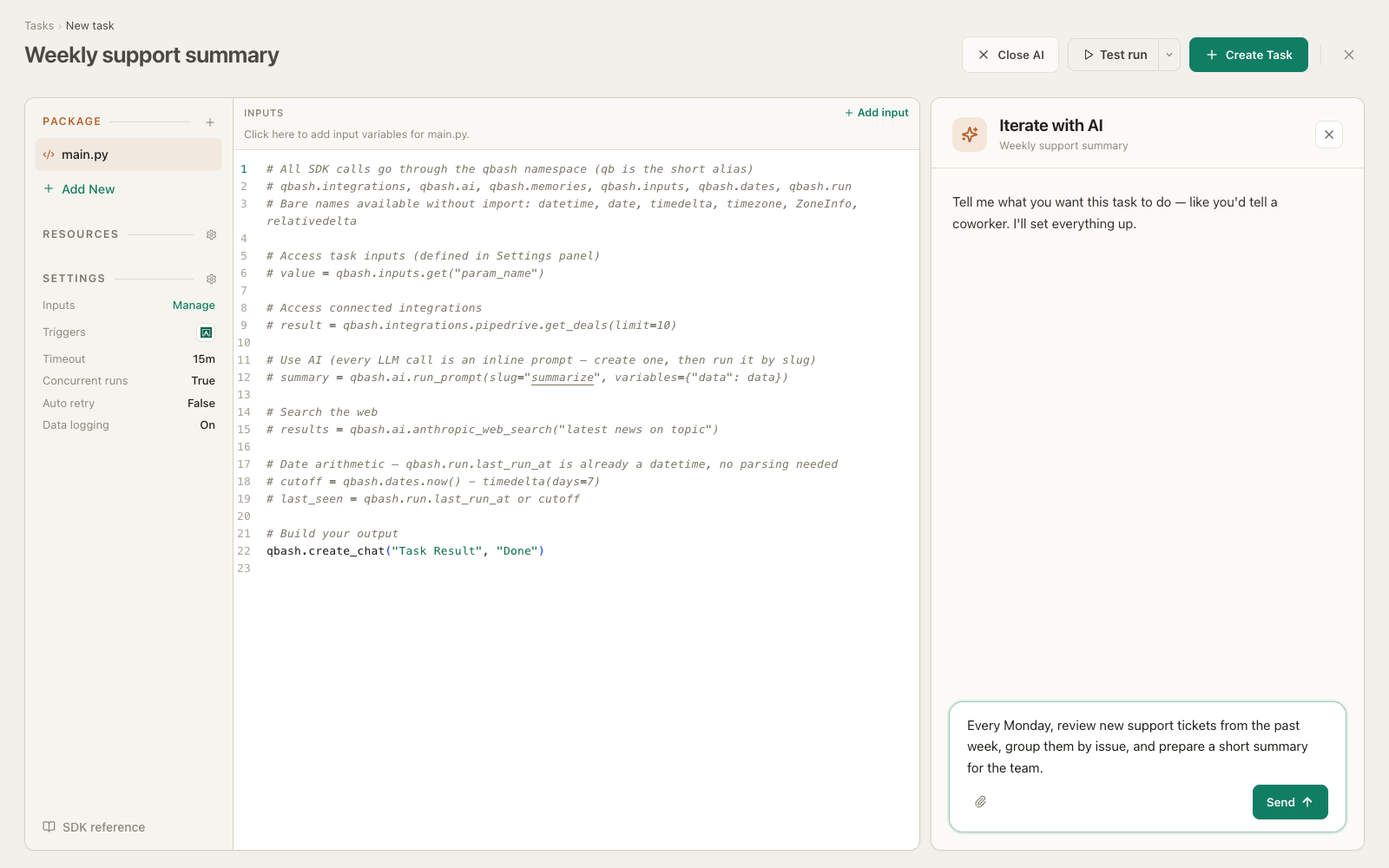
Describe the job in the task editor. Review the AI builder’s draft, then run it on qbash.
company = qbash.inputs.get("company")deal = qbash.integrations.pipedrive.search_deals(term=company,)["deals"][0]news = qbash.ai.gemini_google_search(f"{company} news since {qbash.run.last_run_at}")notes = qbash.memories.search(company,folder="crm-notes",limit=5,)brief = qbash.ai.run_prompt(slug="account-brief",variables={"deal": deal, "news": news, "notes": notes,},)qbash.create_chat("Account brief", brief)
Model and provider agnostic.
AnthropicOpenAIGemini TypeSafe
 xAI
xAI OpenRouter
 Amazon
 Perplexity
 MoonshotAI
 Meta
Meta Qwen
QwenDescribe a job or a change you want to make. The builder drafts or updates the task in the editor, where you can review the result and continue refining it.
Prompts and playgrounds now live inside tasks. Each prompt belongs to the task that calls it, so saving the task versions the prompt with that code.
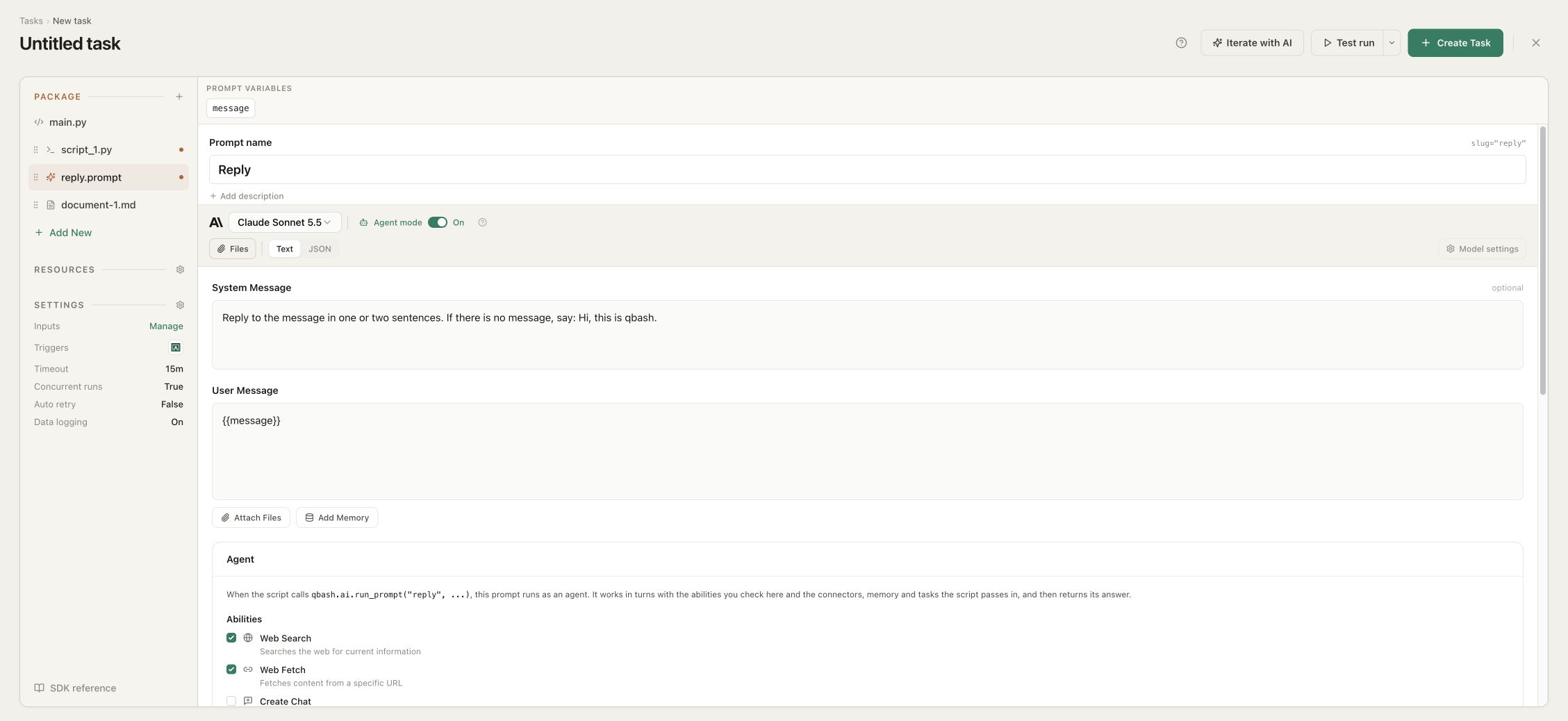
Add an inline prompt from Package. It holds system and user messages, {{variables}} the script fills in, model settings, and a JSON schema when later code reads named fields. The script runs it by slug.
Test run executes the draft with its prompts as they stand in the editor. The console shows the result and the logs, and the run is flagged as a test.
Pick another model in the prompt’s model bar and click Test run again. To see answers next to each other, call the prompt once per model with run_prompt and model= in one run, then return the answers together.
Switch it to Agent mode and check the abilities it may use. The script passes the connectors, memory folders and linked tasks for each call. It works in turns until it has an answer, and the script can stream that answer as the run’s output.
A Task is a Python program for a repeatable workflow. Its code sets the sequence, and model calls handle the steps that need judgment.
The steps are fixed in code, and you version and test the task like an application.
One model deciding as it goes. Flexible for open-ended work a person steers, but non-deterministic, and can burn a lot of tokens.
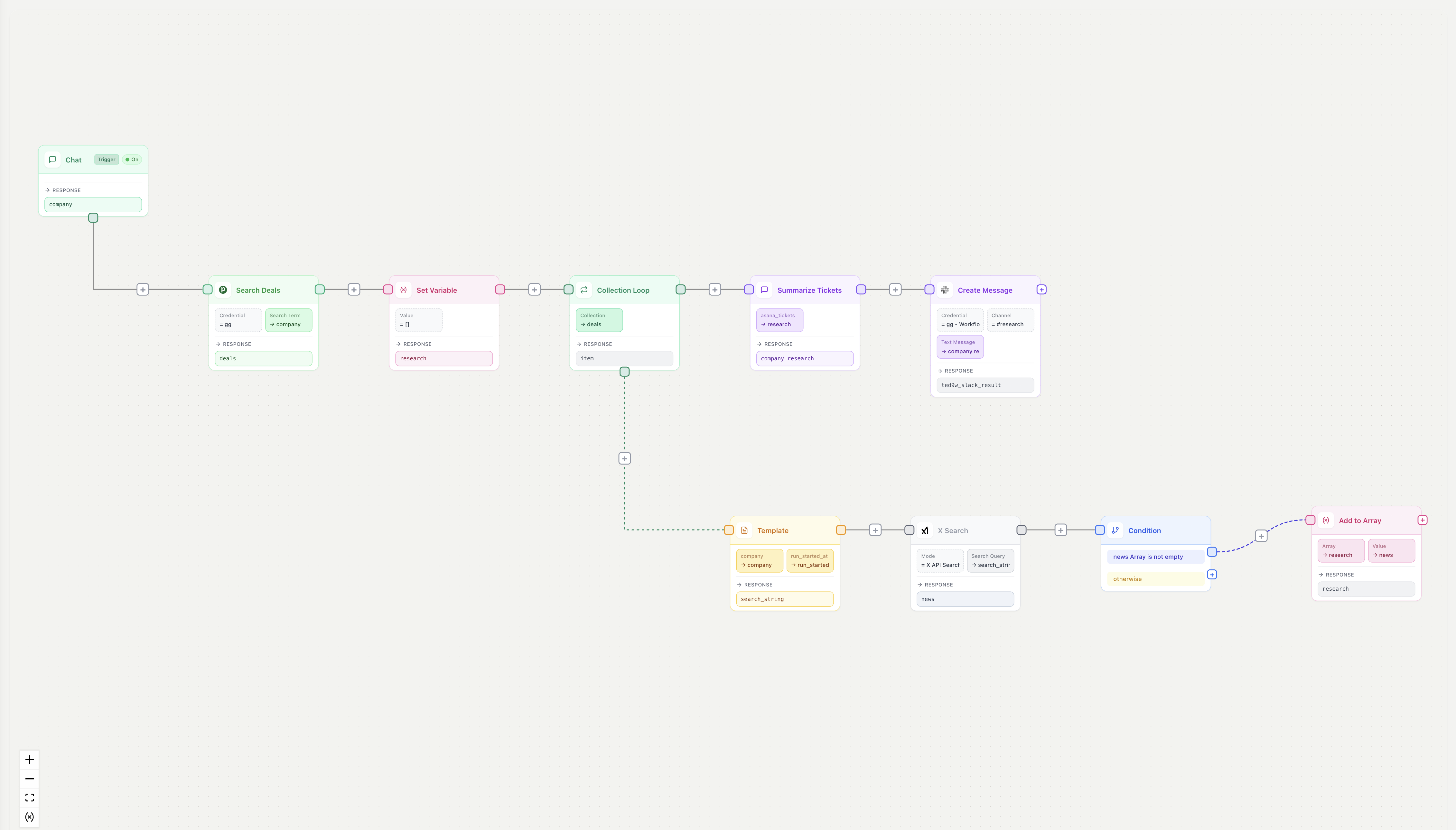
A visual canvas wiring fixed steps together. Deterministic, but the canvas caps how much logic it can express, and every change means re-wiring it.
Prompts belong to the task that uses them. Choose a model for each step, use Jev for typed classification and routing, and keep structured outputs, file and image inputs, and web search in the same task.
Read from and write to a connected service in one call. Real API calls made server-side, not routed through a model. They don't burn tokens: typed, direct, and identical every run.
Read, write, and convert doc, xlsx, and pptx. Split and recombine PDFs, fill a PowerPoint template, zip outputs, and get a presigned download URL back.
Generate a RAG database from content (PDFs, docs, and more) on the fly, or store markdown files and JSON objects between agentic runs. No vector DB or embedding pipeline to stand up.
Eight more modules. Open one for what it does and a sample call.
Provides a task-scoped key-value store with get, set, and a required TTL. Holds an expensive result, such as an API pull or a model call, so a later run reuses it until it expires.
Searches and reads the chat threads of the person running the task, and only that person's threads. Shows a consent banner on the run form. Turns prior conversations into task input.
Records that a unit of work finished, under a key you choose. On retry, qbash.checkpoint.done() reports which keys were already marked, so work you guard runs once and its model calls and side effects are not repeated. A Slack post inside that guard does not post twice.
Reaches any HTTP API through a protected request helper, so an internal or niche service with no prebuilt connector still works from the same script. Returns status, headers, and body for the next step to use.
Reads run inputs with qbash.inputs.get, merging the trigger payload with values a person entered. You declare each input with a type, including text, number, date, select, file, and credential, and qbash renders those declarations as a run form, so a teammate reruns the task by filling fields. A credential input lets the runner pick which account the task acts on.
Fans a function out over a list and collects the results. Takes concurrency, a per-minute rate limit, retries, and an optional checkpoint name as arguments, so fan-out over hundreds of items stays a single call. Pass checkpoint= and each completed item is recorded and skipped on retry.
Fills {{placeholders}} in a PPTX file and preserves the original formatting, so a recurring deck generates from the template the team already approved. Placeholder keys are word characters only.
Exposes the execution id for correlating against logs, the task author, the person who pressed Run, the company and project, timestamps, and a test-run flag. qbash.run.last_run_at returns the previous successful run’s time, and None on the first run, so "process everything since last run" is one property.
Press save and the new version is live. No deploy step, no servers.
A revision on every save. Follow each change and roll back in a click.
Retries, checkpoints that resume a long flow, and timeouts.
Every run records status, inputs, output, errors, and what triggered it.
Swap or upgrade the model behind any step with an edit. No rewrite, no redeploy.
No runtime to patch, no dependencies to drift, no servers to keep alive.
Start a task however you like - and send the result to wherever your users are
Run it from Chat or a Project, and the typed inputs render as a form anyone can fill.

Claude, ChatGPT, Claude Code, and Cursor. Over MCP, a task runs like one of their own tools.
POST inputs as JSON, or start it from a webhook, an inbound email, or a connected-service event.


Put it on a cron and it runs unattended, every night or every few minutes.

The AI flows you build today resemble complex applications: they require logic, control flow, state, maintenance and have dependencies.
Loops, branches, and functions let your code set what runs and when. Tasks are reviewable, versioned, and diffable, so a team can maintain them like software.
Choose a model for each task-owned prompt without changing the surrounding Python. Use Jev for typed classification, scoring, and routing in the same task, with each model used for the work it is built to do.
Tasks can use memories between runs, along with caching, checkpoints, and vector search for documents.
Call a model when the task reaches that step. Cache results and checkpoint long runs to avoid repeating work.
A tests.py file can live with the task. Test the flow end to end before it runs against real services.
Every run is isolated, with restricted builtins and a curated standard library. Credentials are brokered outside your code.
A task orchestrates a deterministic process from code: you decide what runs and in what order, so it is reliable, you can trust it, and it costs what you expect. An agent decides its own path, which is powerful for open-ended work a person steers, but non-deterministic.
Go through our open Jira issues that have no team assigned. For each one, read it, decide which of our twelve teams should own it and how urgent it is, then update the issue. Keep going until everything is triaged.
Oh, and if an issue looks like a duplicate, link it to the original instead of assigning a team. If you cannot tell which team owns it, drop it in the triage backlog with a short note on why. Skip anything already assigned, do not touch closed issues, and if something looks like an outage, mark it urgent and post a heads-up in the incidents channel.
Named here so you don't find out from the docs.
A canvas is hard to manage. Changes are onerous and tough to follow. A task moves the problem into code, where logic is easier to reason about, faster to modify, and version tracking is fast and simple.
# Find every open deal at this company.
company = qbash.inputs.get("company")
deals = qbash.integrations.pipedrive.search_deals(
    term=company,
)["deals"]

# For each deal, grab news since the last run.
research = []
for deal in deals:
    news = qbash.ai.gemini_google_search(
        f"{company} news since {qbash.run.last_run_at}"
    )
    if news:
        research.append({"deal": deal, "news": news})

# Use a prompt owned by this task to write the brief.
brief = qbash.ai.run_prompt(
    slug="account-brief",
    variables={"research": research},
)

qbash.integrations.slack.create_message(
    channel="#revenue",
    text=brief,
)
An AI workflow is a chain of model calls with business rules between them. In a task, Python holds the chain: each step can call a task-owned prompt, and your code reads the answer and decides what runs next.
A classification picks which prompt runs next, and a low-confidence answer goes to a person instead of the next step.
An admin sets which models the organization can use, so expensive models stay with the teams that need them.
A toolkit for building applications and connecting people, systems and agents.
Build and run Python applications with code, AI and connected tools.



Authenticate once. Give applications and agents controlled access to connected services.
Build a hosted server from your chosen Tasks, connector tools and memory folders.
Store documents and findings that Tasks and agents can search, read and update.
Open the editor, write a script against your connected accounts, and put it on a trigger. Or describe it, and the builder drafts the task as code you edit. Starter and Pro both begin with a 14-day free trial.