Model Providers
qbash provides access to selected AI models during your trial. After the trial, your organization needs to connect its own API keys for the providers it uses.
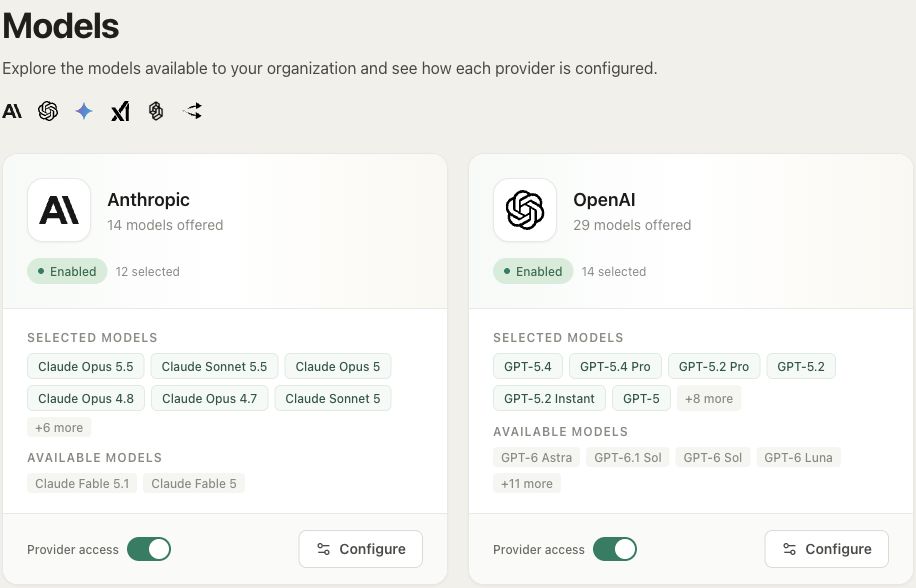
Open Models in the main sidebar to see providers and their available models. Everyone in the organization can view this page, but only admins can add or replace keys and change which models are enabled.
Providers include Anthropic, OpenAI, Google Gemini, xAI, TypeSafe, and OpenRouter. Each has a card showing its connection status and selected models.
Setting up a provider
Click Set Up on a new provider, or Configure on an existing one. Enter an API Key from your account with that provider. The Get API key link opens the provider's key-management page.
Choose the models your team needs under Available Models, then click Save. Enable all selects all models available to your configuration. You can return to Configure whenever you need to change the selection or replace the key.
The key is shared across the organization's calls to that provider; each team member doesn't need to add their own. Usage through your key is billed to your provider account and is subject to that account's limits.
Moving off trial access
Providers using qbash trial keys show the time remaining. Some models are unavailable during the trial and marked Add your own API key to unlock.
Add your own key through Configure before trial access ends to keep using that provider. Saving your key replaces its trial key, and subsequent calls use your provider account. Repeat this for each provider you want to use.
If trial access has already ended, the card may show Needs API key. Add your key, choose the models you need, and enable the provider. A paid qbash plan alone does not replace this setup.
Model availability
The switch on a configured provider's card enables or disables the provider. To change individual models, open Configure and adjust the checkboxes.
These choices apply across the organization. Task authors can choose an enabled model in their prompt settings. Before disabling a provider or model, check whether any existing tasks still rely on it.