Using Secrets
Secrets store sensitive values your tasks need, such as an API key for an internal service. You give the value a name, attach it to a task, and refer to that name in Python. The credential stays out of your code and can be updated in one place when several tasks use it.
Open Secrets in the main sidebar to see the Secrets available to you, who owns them, their access settings, and when they were last used.
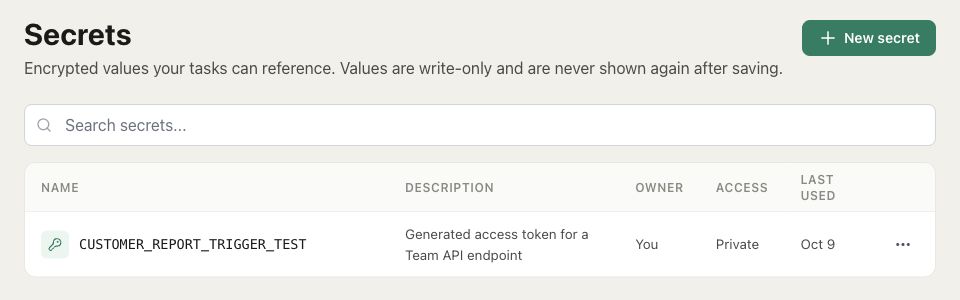
Creating a Secret
Click New secret. Give it a name such as SERVICE_TOKEN, paste the credential into Value, and optionally add a description of what it's for. Names start with a letter and use uppercase letters, numbers, and underscores; each name must be unique within the organization.
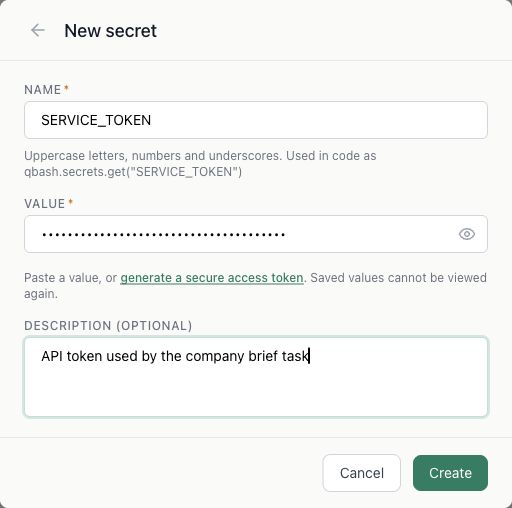
Click Create to save it. The value is encrypted and cannot be viewed again from the Secrets page, including by its owner. You can replace it later if needed.
If you need a new token for callers of your own task, generate a secure access token creates one for you. After saving, qbash shows that generated token once so you can copy it somewhere safe. Select the Secret under Settings → Triggers → API to use it for API authentication. For a third-party service, use a key issued by that service instead.
Using a Secret in a task
In the task editor, open Resources → Secrets and click Attach beside the Secret you need. Save the task to keep that attachment. Creating a Secret on the Secrets page doesn't automatically make it available to every task.
You can also choose New secret inside the Resources panel. A Secret created there is attached to the current draft automatically. The panel flags names referenced in code that haven't been attached yet.
For example, this task calls a service using SERVICE_TOKEN as a bearer token and returns the response body. Replace the example URL with the endpoint for the service that issued your token:
response = qbash.http.request(
    "GET",
    "https://api.example.com/company-brief",
    auth=qbash.http.auth.bearer(qbash.secrets["SERVICE_TOKEN"]),
)

if response["status"] >= 400:
    raise RuntimeError(f"Service returned HTTP {response['status']}")

qbash.output(response["body"])
qbash.secrets["SERVICE_TOKEN"] returns a reference, not the stored value. qbash resolves that reference when it sends the HTTP request, so the raw credential doesn't enter your Python runtime. Pass the reference unchanged: slicing, hashing, or encoding it won't operate on the underlying Secret. The HTTP authentication helpers also support basic authentication, custom headers, and query parameters.
If the Secret isn't attached, the lookup raises a KeyError. For optional credentials, qbash.secrets.get("SERVICE_TOKEN") returns None when it's not attached. See the Secrets SDK reference for the available methods.
Only send a Secret to a service you trust with that credential. Keeping its value out of Python doesn't limit what the receiving service can do with it.
Sharing and updating Secrets
Secrets are private by default. The owner can use the row's ⋯ → Share menu to make a Secret available to specific people or the organization. Sharing lets them attach it to tasks; it doesn't reveal the stored value. People running a task use the Secrets already attached to that task, so consider what those credentials allow when sharing the task or giving someone editing access.
To rotate a credential, choose ⋯ → Edit, replace Value, and save. Tasks attached to that Secret use the updated value on subsequent requests, without changes to their code. Leaving the value field untouched keeps the existing credential.
Renaming a Secret requires updating code that uses its old name. Deleting one can break tasks that still depend on it. The Last used column helps you see when a Secret was used, but isn't a list of every task that depends on it.
API keys used by qbash's built-in model providers are configured separately under Models. See Model Providers.