Prompts
qbash tasks let you build applications that use AI judgement, with prompts as first-class citizens alongside Python code. Prompts can run as traditional AI calls, with a choice of models, model settings, and structured outputs, or in a specialised Agent mode that can launch subagents, work in parallel, and take on more complex requests.
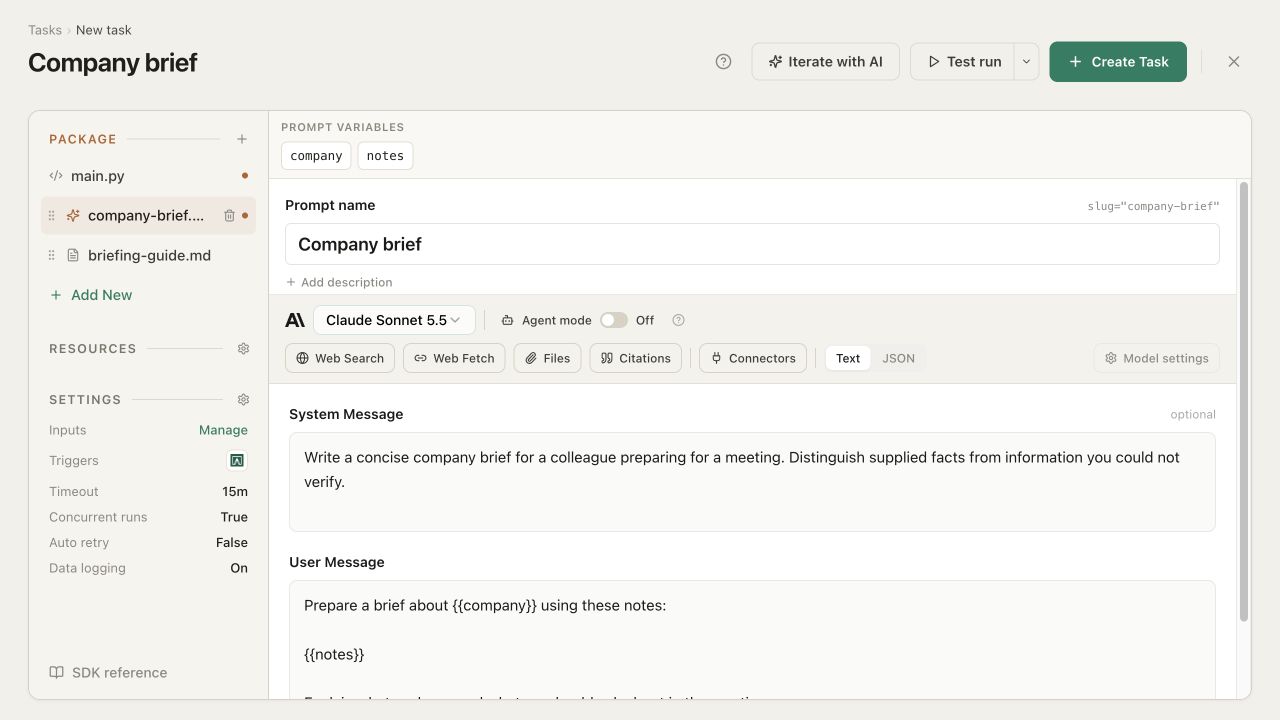
Adding a prompt
Add a prompt from the Package file menu. Give it a name and a slug, which you use to call it from Python:
brief = qbash.ai.run_prompt("company-brief")
Passing inputs to a prompt
Within the prompt, use {{...}} to mark information you will supply from main.py. For example, the company-brief prompt could take a company name and meeting notes:
Prepare a brief about {{company}} using these notes:

{{notes}}

Explain what we know and what we should ask about in the meeting.
The editor automatically recognizes company and notes as variables. Pass their values when calling the prompt from code:
company = qbash.inputs.get("company")
brief = qbash.ai.run_prompt(
    "company-brief",
    {"company": company, "notes": qbash.inputs.get("notes", "")},
)
The "" fallback supplies an empty string when the notes input is absent.
Prompt settings
Each prompt has its own settings in the task's prompt editor. These include the model, model-specific options, and output format, including structured outputs.
Model
qbash supports models from Anthropic, OpenAI, Google Gemini, xAI (Grok), and other providers. Choose the model the prompt will use from those enabled for your organization. Model settings contains its supported options, such as temperature, reasoning effort, and token limits.
Output format
The output format determines what the prompt returns. Depending on the model, you may see up to three options: Text, JSON, and Decisions.
Text is the default and returns a string. JSON returns structured output matching a schema you define - for example, a brief with a summary string and a questions list. Both formats also work with Agent mode.
Decisions, available with Jev and supported models, uses typed questions such as choices, scores, rankings, and yes/no answers. For example, a prompt could return a company-fit score instead of a written brief. The SDK reference covers these formats.
Agent mode
Agent mode makes prompts more dynamic: they can work for longer, launch subtasks, run work in parallel, and follow up over several iterations. The agent uses its enabled abilities and the connectors, memory folders, and linked tasks you pass from Python, within the limits you set.
For the company brief, it could research recent news, follow up on what it finds, and ask a subagent to review sales notes in parallel before combining the findings into an answer.
Turn on Agent mode in the prompt editor to open the Agent panel. Here you choose abilities such as web search, fetching pages, and making HTTP requests, and configure delegation and limits.
Pass the resources the prompt can use from your Python script. For example, with a Pipedrive connection and a Sales notes folder attached to the task:
company = qbash.inputs.get("company")
brief = qbash.ai.run_prompt(
    "company-brief",
    {"company": company, "notes": qbash.inputs.get("notes", "")},
    connectors=["pipedrive"],
    memory=["Sales notes"],
)
Python scripts can provide tools too: you define the inputs a script accepts, and the prompt can call it with values for those inputs. These tools follow the task's access settings, including blocked writes during a Test run.
Pass linked tasks with tasks=[...] to make existing automations available as tools - for example, an account-usage report. Each call starts a run of that saved task; a subagent instead works on instructions delegated by the prompt.
Max iterations sets how many turns the prompt gets to call tools. A turn is one model call plus the tools it asks for; it may use several tools in a turn. At the limit, the model gets one final turn without tools to answer with what it has gathered.
Subagents lets you enable or disable delegation. Max subagents per turn controls how many it can launch in one turn; it also caps how many of these subagents can be running at once. For example, a limit of two allows the news research and sales-note review to run together without letting the prompt keep spawning more workers while they are still busy.
Max task calls caps the total calls to linked tasks during one run_prompt(...) call, including calls made by its subagents. This is separate from the iteration limit: one turn could request several task runs. Once this allowance is used, further linked-task calls return an error and the model can work with the results it already has.
Max output tokens sets the output-token budget across the agent's turns. Set a time limit gives the prompt a time limit in seconds; the task's own timeout still applies to the whole run. These controls let you give a prompt room to investigate while keeping its work bounded. Testing and debugging explains how to inspect its model turns and tool calls.
The SDK reference covers additional arguments and prompt results.