Connect ActiveCampaign
Tasks call ActiveCampaign through qbash.integrations.active_campaign with an API URL and API key stored on the Connectors page. The same connection reads contacts, campaigns and campaign reports, including the contacts who opened a campaign.
After you connect ActiveCampaign, you can add its tools to a qbash MCP server for ChatGPT, Claude and other MCP clients, or call it from a Python task. The ActiveCampaign MCP server page lists what the connector can do.
Find your API URL and key
- Sign in to your ActiveCampaign account.
- Open Settings using the gear icon, then select Developer.
- Under API Access, click Copy API Url and Copy API Key.
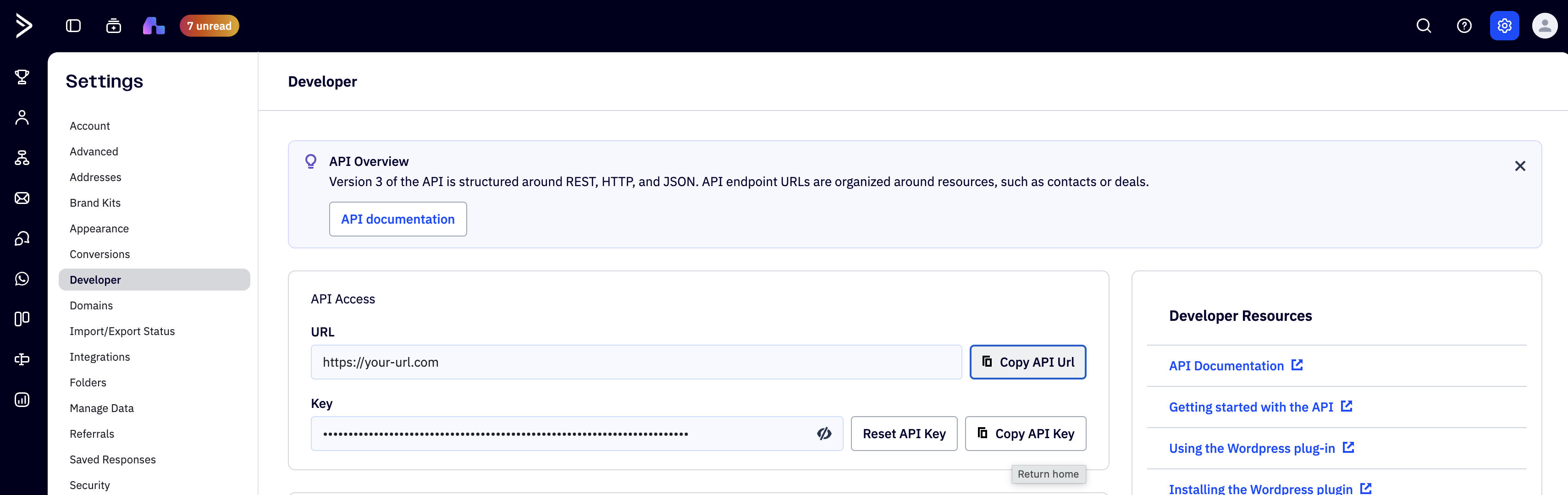
Copy the complete URL shown in your account. ActiveCampaign uses account-specific API hosts, including different hosts for some regions. qbash adds the endpoint paths when it makes a request. See ActiveCampaign's API URL guidance.
ActiveCampaign calls this credential an API Key. The qbash form calls the same value API Token. This connection uses that key, so you do not need to register an OAuth app. Keep the key in the credential form rather than putting it in task code. See ActiveCampaign API authentication.
Add the connection in qbash
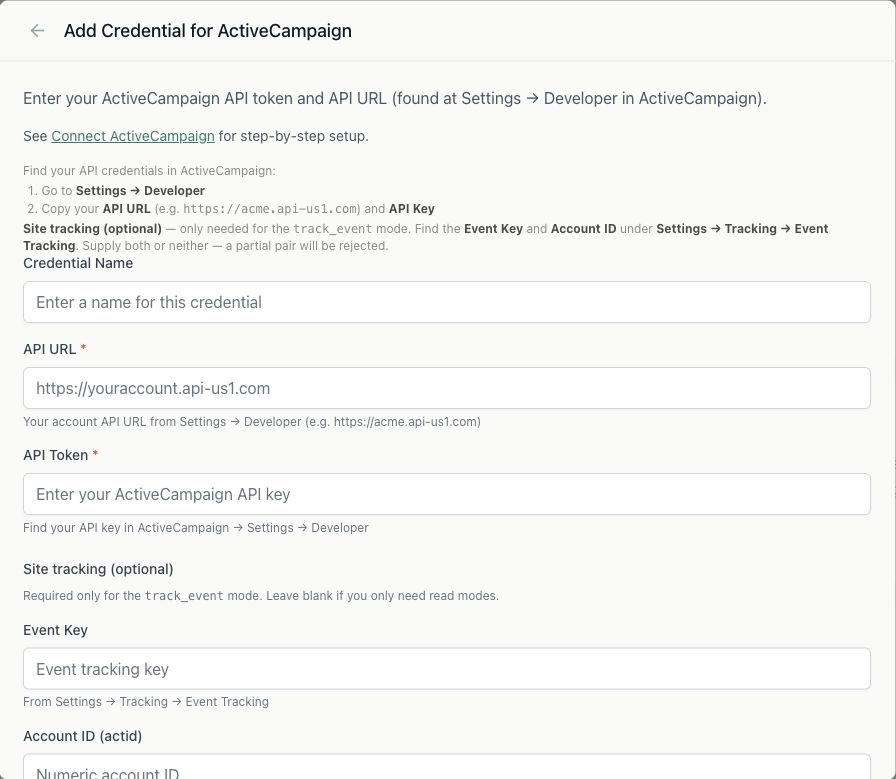
- Open Connectors, select ActiveCampaign, then click Connect.
- Enter a Credential Name that identifies the account.
- Paste the copied URL into API URL and the key into API Token.
- Leave Event Key and Account ID (actid) blank for read tasks. These optional fields are used by
track_event, which writes an event to ActiveCampaign. - Save the connection.
- In the task editor, open Resources → Integrations and select this credential. See Connect resources.
Read a campaign's open report
This example finds a recent completed campaign, reads its open report and prints the number of returned records. Both calls read existing data.
result = qbash.integrations.active_campaign.list_campaigns(
    status="5", limit=20, orders_sdate="DESC"
)

if result["campaigns"]:
    campaign = result["campaigns"][0]
    report = qbash.integrations.active_campaign.list_campaign_opens(
        campaign_id=campaign["id"], page=1
    )
    print("Campaign:", campaign["name"])
    print("Open records on this page:", len(report["opens"]))
    # report["opens"] contains the returned contact-level open records.
    # Pass report["next_page"] as page to continue until it is None.
else:
    print("No completed campaigns found.")
Choose the specific campaign ID when building a newsletter report. A contact's last-opened date can include other campaigns and automation emails.
list_campaigns uses limit and an offset supplied as cursor, returning next_cursor. Campaign open reports use page and return next_page. The report API can return larger pages than its documented page size, so follow the returned continuation. A final empty-page request may be needed. list_campaign_link_clicks returns its complete link report with clicker records in each link's info list.
The SDK Reference lists the read methods, parameters and response fields. Open and click reports use the API URL and key already selected for the task. No separate report token is required.
Troubleshoot the connection
- No campaign or open records: Check that the account has a sent campaign with tracked opens and that your task selected its credential. Empty results can be valid for an account with no matching data.
- A permission error on CRM data: Check access to that resource and the account's plan. A refused deal or account request can occur while campaign reports still work.
- The URL fails: Copy it again from Settings → Developer. Use the account's full HTTPS API URL.
- The key stops working: Edit the qbash connection after an API key reset or change of key owner. Each ActiveCampaign user has their own API credentials. Deleting that user breaks integrations using their key. ActiveCampaign's API setup guide covers key resets and ownership.
Recorded opens can include automated email activity. Treat the report as evidence of tracked opens when interpreting engagement.