Connect Stripe
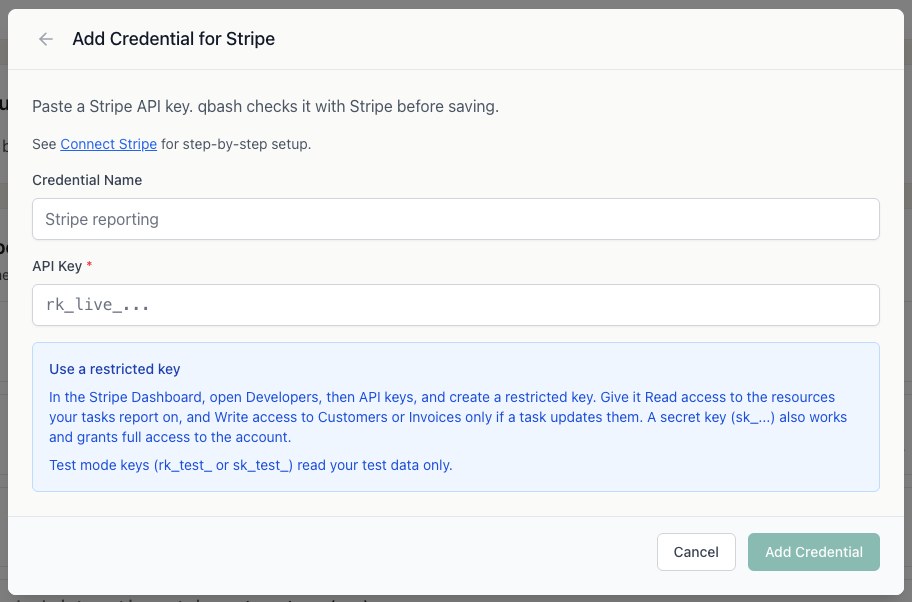
Tasks call Stripe through qbash.integrations.stripe with an API key you store on the Connectors page. A restricted key limits a task to the Stripe resources it reads, and a test mode key limits it to test data while you build.
After you connect Stripe, you can add its tools to a qbash MCP server for ChatGPT, Claude and other MCP clients, or call it from a Python task. The Stripe MCP server page lists what the connector can do.
Create a restricted key
- Sign in to the Stripe Dashboard. To build against test data first, switch on Test mode or open a sandbox. Test keys start with
rk_test_and read test data only. - Open Developers, then API keys, and click Create restricted key.
- Set Read on each resource your task uses. A reporting task usually needs Balance, Charges, Customers, Invoices, PaymentIntents, Payouts, Prices, Products, Refunds and Subscriptions. Add Disputes and Events if the task reads them.
- Set Write on Customers only if the task calls
create_customerorupdate_customer, and on Invoices only if it callssend_invoice. No method in the integration moves money, so no other write permission is needed. - Create the key and copy it.
A secret key (sk_test_ or sk_live_) also works, but it grants full access to the account.
Add the key in qbash
- Open Connectors, then Stripe, and click Connect.
- Give the credential a name and paste the key. qbash rejects publishable keys (
pk_) and checks the key with Stripe before saving it. - In the task editor, open Resources → Integrations, and select the credential. See Connect resources.
Call Stripe from a task
report = qbash.integrations.stripe.list_invoices(status="open", limit=20)

for invoice in report["invoices"]:
    print(invoice["number"], invoice["customer_email"], invoice["amount_remaining"] / 100)
Every list method takes limit and cursor and returns next_cursor. Pass next_cursor back as cursor to read the next page. The list methods also take created_gte and created_lte as an ISO date, an ISO datetime or a unix timestamp. The SDK Reference lists every method.
Add test data
A new test mode account has no payments, so most list methods return empty pages. The Stripe CLI creates test objects from the command line:
stripe login
stripe trigger customer.subscription.created
stripe trigger payment_intent.payment_failed
stripe trigger charge.refunded
The first command creates a customer, product, price, subscription and invoice together.
Details that affect results
- Amounts are integers in the smallest currency unit, so 4990 is $49.90. Zero-decimal currencies such as JPY are already whole units.
- The search methods read an index that can lag new writes by about a minute.
- Stripe keeps events for 30 days, so
list_eventscannot reach further back. monthly_amounton a subscription uses list prices. Discounts, tax and metered usage are left out.- If the key lacks a permission, that call fails with Stripe's error and the credential keeps working for the calls it is allowed to make.