Connect X
The X connector uses your own developer app with OAuth 2.0 user authorization. Your X developer account supplies the API access and pays for requests. qbash stores the Client Secret and tokens encrypted, and manages token refresh.
After you connect X, you can add its tools to a qbash MCP server for ChatGPT, Claude and other MCP clients, or call it from a Python task. The X MCP server page lists what the connector can do.
Create your X app
-
Sign in to the X Developer Console. If you do not have developer access, complete X's registration and describe your use case.
-
Open Apps, then Create App. Enter an application name, select a project with the API access you need, and choose its environment. Create the app. The current console requires at least one project connection.
-
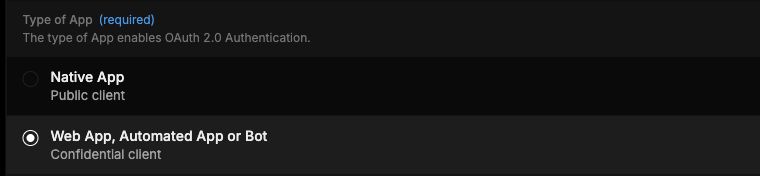
Open the app and click Settings. Under Type of App, select Web App, Automated App or Bot, the confidential client option. This enables OAuth 2.0 and gives the app a Client Secret.
-
Under App info, add Callback URI / Redirect URL:
https://app.qbash.com/oauth/x/callbackMatch the URL exactly, including the protocol and path. Do not add a trailing slash. If your qbash installation uses another hostname, register that installation's callback instead.
-
Enter your website's HTTPS URL in Website URL. Fill in organization, terms and privacy URLs if your app or X's review process requires them. Click Save Changes.
-
Return to Keys & Tokens. Under OAuth 2.0 Keys, copy the Client ID and Client Secret. These are separate from the Consumer Key, the OAuth 1.0 Access Token and the app-only Bearer Token. Store the secret securely when X shows it.
-
Check your project's API access and your account's credit balance. Configure your own spending limit in the console. Adding credentials to qbash does not buy API credits or enable auto-recharge.
The App permissions choices above Type of App configure OAuth 1.0a. OAuth 2.0 permissions come from the scopes requested during consent. qbash does not request email or Direct Message access.
X documents app configuration, developer access and API billing. A working app still needs the relevant endpoint access and credits. This guide does not promise approval for every account or use case.
Connect the app in qbash
- Open Connectors → X, then click Connect.
- Enter a credential name, your OAuth 2.0 Client ID, and Client Secret.
- Click Connect with X. Sign in to the X account whose identity and posts your task should use, then review and authorize the requested permissions.
- In your task editor, open Resources → Integrations and explicitly select this X credential. See Connect resources.
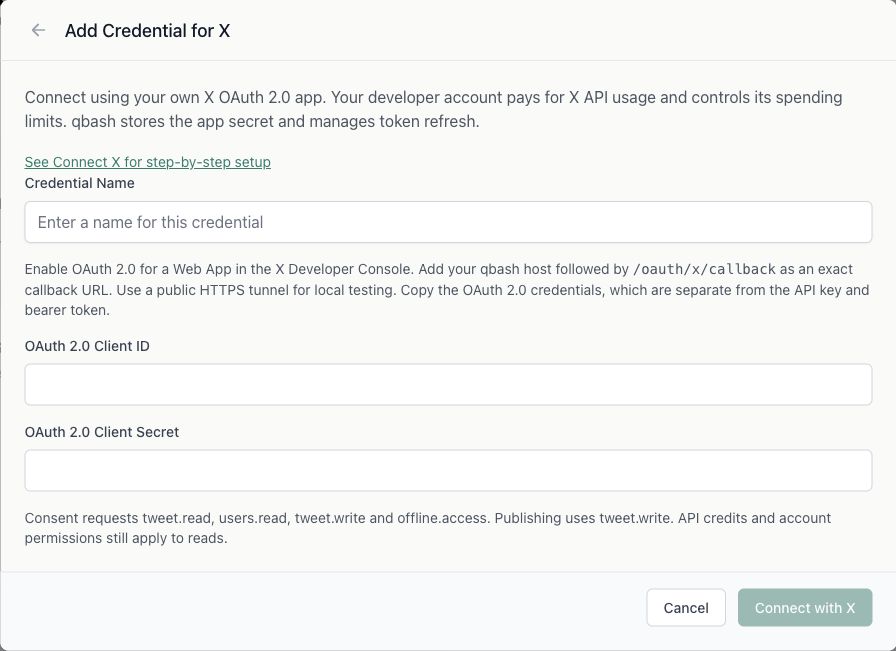
The consent flow requests tweet.read, users.read, tweet.write, media.write and offline.access. The connector currently requests publishing permission even for tasks that only read. media.write lets a task upload images, GIFs and video, so your X app must also allow media upload, and a connection made before qbash requested media.write must reconnect before it can upload. offline.access supplies the refresh token used for scheduled tasks. Access tokens normally last two hours, and refresh uses the same app credentials. Revoking consent or changing the app secret can require reconnecting.
Authentication coverage
Both app-only tokens and OAuth user tokens use a Bearer authorization header. Their permissions differ:
| Capability | App-only token | OAuth 2.0 user token |
|---|---|---|
| Recent search, public profile/post lookup, timelines, mentions, recent counts and trends | Supported by X | Supported by X |
Connected user's identity (get_me) | Unavailable | Supported |
| Private post metrics | Unavailable | For the authenticated author's eligible posts from the last 30 days |
Publishing (create_tweet) | Unavailable | Requires tweet.write |
Media upload (upload_media, get_media_status) | Unavailable | Requires media.write |
OAuth 2.0 user tokens cover all thirteen current qbash X methods, subject to scopes, ownership and API access. qbash accepts customer-owned OAuth connections only. Manually pasted app-only and OAuth 1.0 tokens are unsupported.
This coverage applies to the connector's methods. X also has app-only endpoints outside this connector, including filtered streams, compliance jobs, full-archive counts and API usage reports. They would need a separate app-only authorization path if added. See X's current endpoint specification.
Read from a task
profile = qbash.integrations.x.get_me()["user"]
page = qbash.integrations.x.list_user_tweets(
    user_id=profile["id"],
    max_results=5,
)
print({"post_count": page["count"]})

cursor = page["meta"].get("next_token")
if cursor:
    following = qbash.integrations.x.list_user_tweets(
        user_id=profile["id"],
        max_results=5,
        pagination_token=cursor,
    )
    print({"next_page_count": following["count"]})
list_user_tweets returns one page and preserves X's pagination metadata. The other search and timeline methods currently return one page without a continuation cursor. Recent search and recent counts cover the last seven days. Private metrics are not guaranteed for another user's post or an older post.
The SDK Reference lists the methods, arguments and result fields. The repository's test-tasks/x-test.py exercises existing reads and one available continuation. It never publishes or creates test posts. Use an account with existing posts if you want the post lookup and private metrics checks to run.
Replace an old connection
Connections created with qbash's former OAuth app must be replaced. Create a new connection using your own Client ID and Secret, authorize your account, then select that credential in each task or MCP server that uses X. The old app's tokens cannot be transferred to your app. Renaming a connection does not replace its app credentials.
Local and staging setup
For local testing, use your public HTTPS tunnel hostname followed by /oauth/x/callback, such as https://YOUR-TUNNEL.ngrok.app/oauth/x/callback. Register the exact URL that the backend sends as redirect_uri. The backend constructs it from HOST_URL plus /oauth/x/callback. Have the local operator configure that public host and its routing before starting consent. Do not register localhost as the hostname.
For staging, register https://YOUR-STAGING-HOST/oauth/x/callback. X permits multiple callbacks per app, though separate apps make environment billing and access easier to inspect. Production uses https://app.qbash.com/oauth/x/callback unless your installation has a different public host.
Customers enter their app credentials in qbash. They do not need server environment variables. The X integration deliberately prevents fallback to the old X_CLIENT_ID and X_CLIENT_SECRET environment values.
When a call fails
- 401: The user token may be expired or revoked. Reconnect the customer-owned credential.
- 403: Check granted scopes, post ownership and the project's endpoint access. A refusal for one resource does not establish that the token expired.
- 402 or exhausted credits: Review your own developer account's balance and spending limit.
- 429: Respect the endpoint's rate limit before retrying.
- Callback mismatch: Compare the registered URL to the authorization request's
redirect_uri, including the hostname, protocol, path and trailing slash.