Connect Linear
Tasks call Linear through qbash.integrations.linear with a personal API key saved on the Connectors page. The key can read only the data its owner can access, with further restrictions for the permissions and teams you select.
After you connect Linear, you can add its tools to a qbash MCP server for ChatGPT, Claude and other MCP clients, or call it from a Python task. The Linear MCP server page lists what the connector can do.
Create a personal API key
-
Sign in to Linear. To test writes, create a dedicated test team or workspace first.
-
Open Settings. Under Personal, select Security & access.
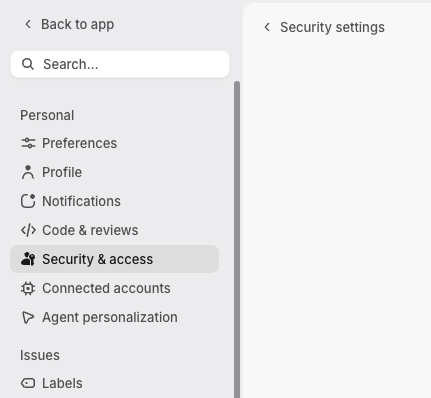
-
Open Personal API keys, then click New API key.
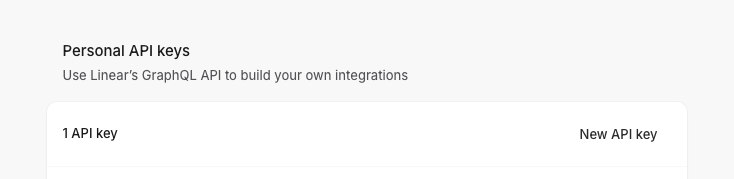
-
Give the key a name and Read permission. Restrict it to the teams your task uses.
-
Add Create issues for
create_issueand Create comments forcreate_comment.update_issuerequires Write, which grants broader write access. Admin permission is not needed. -
Create and copy the key.
If you cannot create a key, ask a workspace admin to enable Member API keys under Settings → Administration → API. Linear documents the controls in API and Webhooks.
Add the key in qbash
- Open Connectors, then Linear, and click Connect.
- Enter a credential name and paste the personal API key. qbash reads the authenticated user's profile to check the key before saving it. The connector requires Read permission for this check.
- In the task editor, open Resources → Integrations and select this credential. See Connect resources.
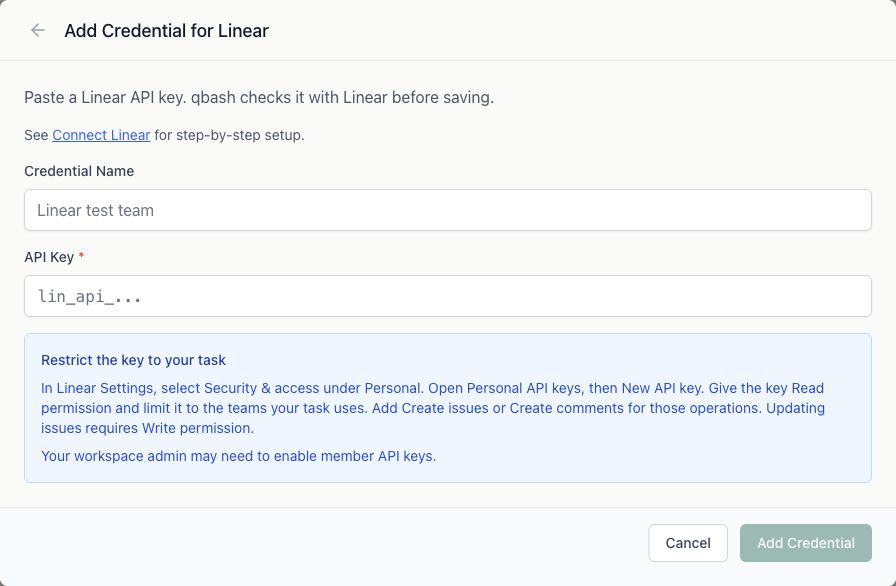
When editing a credential, leave the key blank to keep the saved key. Renaming the credential preserves its authentication status.
Read issues from a task
report = qbash.integrations.linear.list_issues(
    state_type="started",
    limit=50,
)
for issue in report["issues"]:
    print(issue["identifier"], issue["title"], issue["url"])
list_issues supports team, project, assignee, workflow category, priority, title substring and an inclusive updated_since timestamp. It returns the most recently updated issues first. Every list method reads one page and returns next_cursor and has_more. Pass next_cursor back as cursor until it is None to read subsequent pages. Keep the same filters while paging.
Find UUIDs with list_teams, list_users, list_projects, list_cycles, list_workflow_states and list_labels. In Linear, Cmd/Ctrl+K → Copy model UUID also copies the UUID of the current resource. Issue lookup, updates and comments accept an issue identifier such as ENG-123 as well as a UUID.
Create and update issues
created = qbash.integrations.linear.create_issue(
    team_id="YOUR_TEST_TEAM_UUID",
    title="Review the weekly bug report",
    description="Created by the qbash test task.",
)
issue_id = created["issue"]["id"]
qbash.integrations.linear.update_issue(issue_id=issue_id, priority=3)
qbash.integrations.linear.create_comment(
    issue_id=issue_id,
    body="The weekly report is ready for review.",
)
Updates change only supplied fields. None leaves a field alone. To remove an assignee, project, cycle, due date, estimate or description, pass its SDK field name in clear_fields, such as clear_fields=["assignee_id"]. label_ids replaces the entire label list. Pass [] to remove all labels.
The SDK Reference lists every method and parameter.
Prepare test data
Create a test team with a project, a label and a few issues in different workflow states. Assign one issue, attach it to the project, and add a comment. Enable cycles for the team and create or use a cycle to test list_cycles. A team without cycles can return an empty page.
The repository's test-tasks/linear-test.py exercises every read mode. Its write flag defaults to false. When enabled with a test team UUID, it creates one issue and updates and comments only on that issue.
Details that affect results
- The key's permissions and team restrictions determine the records a task can reach. A permission refusal does not invalidate the key.
- Archived resources are excluded by default. Pass
include_archived=Trueto include them. User lists exclude disabled users. querymatches issue titles only. It does not search descriptions or comments.- Priority is 0 for none, 1 urgent, 2 high, 3 normal and 4 low. Due dates use
YYYY-MM-DD, whileupdated_sincerequires an ISO 8601 timestamp with a timezone. - A team filter on
list_labelsincludes that team's labels and workspace labels. Project progress is the value Linear reports, not a percentage computed by qbash. - Linear limits personal API key calls per user, so multiple keys share the quota. Query complexity and individual operations have additional limits. See Rate limiting.
- The connector reports GraphQL errors even if Linear returns HTTP 200 with partial data. Writes are not retried automatically. After a timeout or service error, check Linear before retrying to avoid a duplicate issue or comment.